If you’ve ever sent a multi-page document to the printer and ended up with a chaotic pile of pages, you’ve probably run into the collated vs uncollated printing question without even realizing it. It sounds technical, but once you understand the difference, it completely changes how you manage print jobs — and saves you a lot of sorting time.
Last updated: June 9, 2026
What Does Collated Printing Mean?
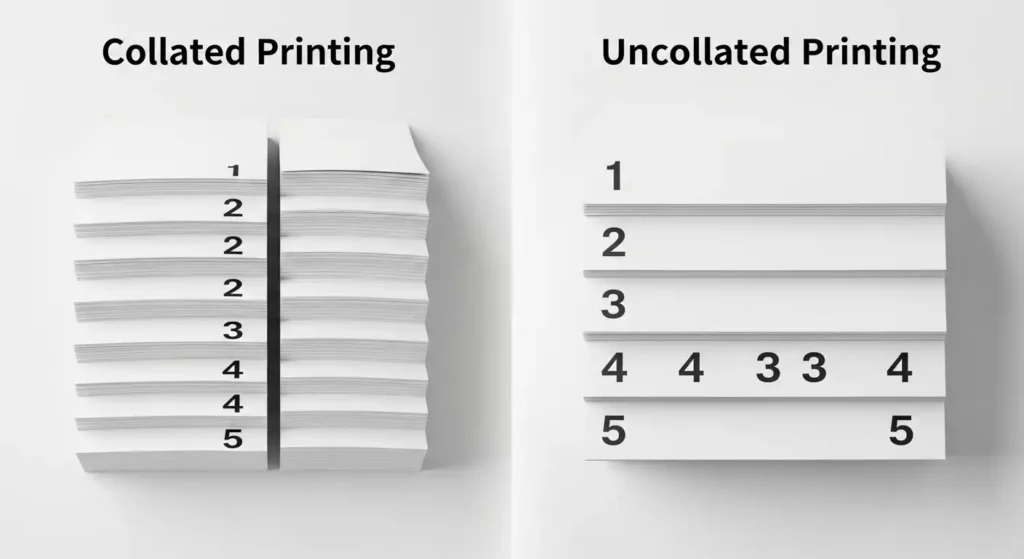
Collated printing means your printer outputs pages in sequential order for each complete copy. So if you’re printing five copies of a 10-page document, you get:
- Copy 1: Pages 1–10
- Copy 2: Pages 1–10
- Copy 3: Pages 1–10
- And so on…
Each set comes out as a complete, ready-to-go document. You just grab each stack and it’s already in order. No manual sorting needed.
Think of it like a printer doing the organizing work for you.
When Should You Use Collated Printing?
Collated is the go-to option for most office and professional printing situations. Use it when:
- You’re printing handouts for a meeting or presentation
- You need multiple copies of a report or proposal
- You want documents that are ready to staple or bind immediately
- You’re printing booklets or instruction manuals
It’s the default setting on most printers for a good reason — it just makes life easier.
What Does Uncollated Printing Mean?
Uncollated printing does the opposite. Instead of completing one full set before moving to the next, your printer outputs all copies of page 1 first, then all copies of page 2, and so on.
So five copies of that same 10-page document would look like:
- Pages 1, 1, 1, 1, 1
- Pages 2, 2, 2, 2, 2
- Pages 3, 3, 3, 3, 3
- All the way through to page 10
You end up with organized stacks by page number, not by document set. That means you’d need to manually pull one page from each stack to assemble a complete copy.
Depomin: Uses, Benefits, Side Effects & Dosage Guide
When Should You Use Uncollated Printing?
Uncollated actually has its own set of practical advantages. It works best when:
- You need to distribute individual pages separately (like flyers or single-sheet handouts)
- You’re printing pages that will be sorted by someone else or a finishing machine
- You want to insert different paper types between specific pages
- A print shop is handling the assembly for you
So it’s not a lesser option — it’s just designed for different workflows.
Collated vs Uncollated Printing: A Side-by-Side Comparison
Here’s a quick breakdown to make the difference crystal clear:
| Feature | Collated | Uncollated |
|---|---|---|
| Output order | Full sets in sequence | All copies of each page grouped |
| Best for | Meetings, reports, handouts | Flyers, single-sheet distribution |
| Manual sorting needed? | No | Yes (usually) |
| Print speed | Slightly slower | Slightly faster |
| Default setting | Usually yes | No |
Pros and Cons of Collated Printing
Pros:
- Documents come out ready to use — no sorting required
- Saves significant time when printing large quantities
- Reduces the chance of pages getting mixed up
- Ideal for professional, client-facing documents
Cons:
- Can be slightly slower because the printer processes each full set before starting the next
- Uses more printer memory for complex documents
- If a jam happens mid-print, you may lose a full incomplete set
Pros and Cons of Uncollated Printing
Pros:
- Generally faster to print, especially for high-volume jobs
- Easier when pages need to be distributed or handled individually
- Works well with finishing equipment that sorts automatically
- Simpler for printing single-page documents in bulk
Cons:
- Requires manual sorting to assemble complete document sets
- Higher risk of pages getting mixed up during assembly
- Not practical for immediate use without extra effort
Practical Examples to Make It Click
Example 1 — The Office Meeting You’re printing 20 copies of a 5-page agenda for a team meeting. You want to walk in and hand each person a complete packet. Collated is the right call here — each set comes out complete and ready to hand over.
Example 2 — The Flyer Drop You’re printing 500 single-page flyers for a local event. Since every page is identical and stands alone, uncollated makes total sense. The printer just hammers through 500 copies of the same page as fast as possible.
Example 3 — The Training Manual You need 10 copies of a 30-page training guide that will be bound with a spiral binder. Use collated. Each complete set comes out in order and goes straight to binding without any sorting.
Example 4 — The Print Shop Job You’re sending a complex booklet to a professional print shop that uses automated finishing equipment. They may actually prefer uncollated so their machines can handle sorting and binding more efficiently. Always check with the shop first.
Common Mistakes People Make
Even once you understand the concept, it’s easy to slip up. Here are the most common errors:
1. Forgetting to check the setting before printing Most software defaults to collated, but not always. Always glance at the print dialog before hitting print, especially on unfamiliar printers or software.
2. Assuming collated is always better It’s the right choice most of the time, but not always. If you’re sending to a print shop or printing single-page documents in bulk, uncollated can actually be more efficient.
3. Printing large jobs without testing first Before printing 100 copies of anything, print two or three copies first. Confirm the collation setting is correct, check the page order, and make sure formatting looks right. It takes 30 seconds and can save a massive headache.
4. Confusing collation with duplex printing These are two separate settings. Duplex controls whether you print on both sides of the paper. Collation controls the output order. You can use both together, but they work independently.
5. Not accounting for printer speed Collated printing can slow down your printer, especially for long documents. If you’re in a rush and the document order doesn’t matter, uncollated is faster.
Best Practices for Collated and Uncollated Printing
Follow these simple tips to get your print jobs right every time:
- Always preview your print settings before confirming the job, especially for large runs
- Use collated as your default for anything that needs to be read, presented, or handed out as a complete set
- Switch to uncollated when speed matters and sorting isn’t a concern
- Label your stacks when printing uncollated in large quantities — it’s easy for pages to get shuffled
- Communicate with your print shop if outsourcing — they’ll tell you exactly which setting fits their workflow
- Save your preferred settings as a print profile in your software if you do regular jobs with the same requirements
Conclusion
At the end of the day, collated vs uncollated printing comes down to one simple question: do you want the printer to organize your pages, or will you handle that later?
Collated printing is the smarter choice for most everyday tasks — meetings, reports, presentations, and anything you want ready to go the moment it comes off the printer. Uncollated shines when you’re printing single-page materials in bulk or working with professional finishing equipment.
Neither option is wrong. They’re just built for different situations. Once you know the difference, you’ll never second-guess that print dialog again.
Frequently Asked Questions
1. What is the difference between collated and uncollated printing?
Collated printing outputs complete document sets in sequence, so each copy comes out in order. Uncollated printing groups all copies of each page together, requiring manual sorting afterward.
2. Should I print collated or uncollated for a presentation?
Always use collated for presentations. Each complete set comes out ready to hand to your audience without any sorting.
3. Does collated printing take longer?
Slightly, yes. Because the printer completes each full set before starting the next, it can be a bit slower than uncollated — especially for long or complex documents.
4. Is collated the default print setting?
On most modern printers and print dialog boxes, collated is set as the default. However, it’s always worth double-checking before sending a large job.
5. When would a print shop prefer uncollated printing?
Professional print shops often prefer uncollated jobs when they use automated finishing equipment like sorters and binders, which handle the page organization more efficiently than a standard office printer would.
Source: Britannica
Related Articles
- Master EROEM: The Ultimate Guide to Media Efficiency
- Quay Davis: The Rising Star You Need to Know
- How NeroVet AI Dentistry Is Changing Pet Dental Care
Editorial Note: This article was researched and written by the Floral Loft SAC editorial team. We fact-check our content and update it regularly. For questions or corrections, contact us. Knowing how to address collated vs uncollated printing early makes the rest of your plan easier to keep on track.